Building a RESTful API with Node.js
RESTful APIs are a popular way of building web applications that communicate with each other. In this tutorial, we will learn how to build a RESTful API using Node.js and the popular Express framework. Prerequisites
Before we start building the API, we need to have the following installed on our system:
Node.js
NPM (Node Package Manager)
Getting Started
To get started, let’s create a new Node.js project and install the necessary dependencies. Open your terminal and run the following commands:
mkdir rest-api
cd rest-api
npm init -y
npm install express body-parser
Next, let’s create a new file called server.js in the root directory of our project and add the following code:
const express = require('express');
const bodyParser = require('body-parser');
const app = express();
app.use(bodyParser.json());
const port = 3000;
app.listen(port, () => {
  console.log(`Server running on port ${port}`);
});
The above code sets up an Express server that listens on port 3000 and uses the body-parser middleware to parse incoming requests with JSON payloads. Creating the Routes To create the routes for our API, let’s create a new file called routes.js in the root directory of our project and add the following code:
const express = require('express');
const router = express.Router();
router.get('/', (req, res) => {
  res.send('Hello, world!');
});
module.exports = router;
The above code creates a new Express router that responds to GET requests to the root URL (/) with a simple "Hello, world!" message.
Next, let’s update server.js to use the new router:
const express = require('express');
const bodyParser = require('body-parser');
const routes = require('./routes');
const app = express();
app.use(bodyParser.json());
app.use('/', routes);
const port = 3000;
app.listen(port, () => {
  console.log(`Server running on port ${port}`);
});
Now, when we run our server and visit http://localhost:3000/ in a web browser, we should see our "Hello, world!" message.
Adding Middleware Middleware is a powerful feature of Express that allows us to modify incoming requests or outgoing responses before they are processed by our routes.
For example, let’s create a new middleware that logs incoming requests to the console. Add the following code to server.js:
app.use((req, res, next) => {
  console.log(`${req.method} ${req.path}`);
  next();
});Authentication
npm install jsonwebtokenconst jwt = require('jsonwebtoken');
const secretKey = 'my-secret-key';
function generateToken(payload) {
return jwt.sign(payload, secretKey, { expiresIn: '1h' });
}
function verifyToken(token(token) {
try {
const decoded = jwt.verify(token, secretKey); return decoded;
} catch (error) {
return null;
}
}
module.exports = { generateToken, verifyToken };const express = require('express');
const { generateToken, verifyToken } = require('./auth');
const router = express.Router();
router.get('/', (req, res) => {
res.send('Hello, world!');
});
router.post('/login', (req, res) => {
const { username, password } = req.body;
if (username === 'admin' && password === 'password') {
const token = generateToken({ username });
res.json({ token });
} else {
res.status(401).json({ error: 'Invalid username or password' });
}
});
router.get('/protected', (req, res) => {
const token = req.headers.authorization?.split(' ')[1];
const payload = verifyToken(token);
if (payload) {
res.send(`Hello, ${payload.username}!`);
} else {
res.status(401).json({ error: 'Invalid or missing token' });
}
});
module.exports = router;A POST /login route that accepts a JSON payload with a username and password, verifies the credentials, and returns a JWT if the credentials are valid.
A GET /protected route that requires a valid JWT to access. The route reads the JWT from the Authorization header and uses the verifyToken function to decode the payload. If the token is valid, the route sends a personalized greeting to the user; otherwise, it returns an error.
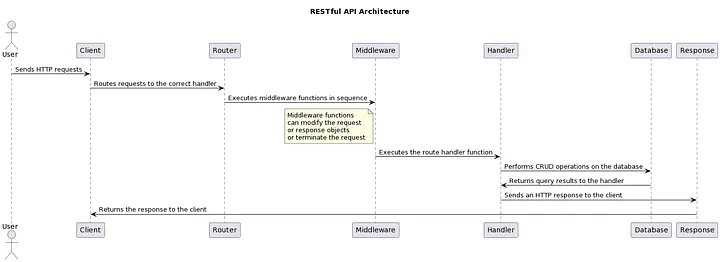
Conclusion In this tutorial, we learned how to build a RESTful API using Node.js and Express. We covered topics such as routing, middleware, and authentication, and used popular packages such as body-parser and jsonwebtoken to simplify our code. We also saw how to use architecture diagrams to visualize our application's components and understand how they work together. Thanks for reading! #Nodejs #RESTfulAPI #Express #Middleware #Authentication #JSONWebTokens

Kiran Chaulagain
kkchaulagain@gmail.com
Software engineer and DevOps practitioner with 6+ years of experience turning ideas into scalable web applications and reliable infrastructure. Passionate about clean code, automation, and bridging the gap between development and operations.